
This blog was human-written by me, Tyler Tafelsky. I am not affiliated with any tools mentioned in this post. I only share what I’ve found helpful.
With generative AI making it easy to write for you, tools like ChatGPT, Gemini, and Perplexity have become mainstream writing assistants.
While it seems like a revolutionary milestone on the surface, there are deeper consequences. Not only are AI tools notoriously inaccurate, but they also extract the mental effort that goes into the writing process.
Over half (51%) of Gen Z (aged 14–29) in the U.S. use generative AI on a weekly or daily basis, according to Gallup. It’s widely prevalent across many use cases, from writing essays, blog posts, news stories, webpage copy, emails, and so on.

In turn, there’s rising adoption in AI detector tools, and the user base for these platforms is just as vast as the use cases for generative AI.
- Professors and educators are using AI detection tools to check students’ writing assignments.
- Conversely, students use AI text detectors to ensure their work meets minimum thresholds.
- Writers, like me, use AI checkers to minimize the amount of AI-detected text before delivering work.
- Editors and project managers use AI detection tools for quality control to meet editorial standards and client expectations.
I’ve been a professional writer for the last two decades and an AI enthusiast for the last 5 years. Having embraced the use of AI as a writing assistant (and been slapped on the wrist a few times as a result), I’ve used my fair share of AI content detector tools.
If you want to skip to the relevant stuff, scroll down to see the best AI detection tools that I’ve used and recommend.
Why AI Detection is on the Rise
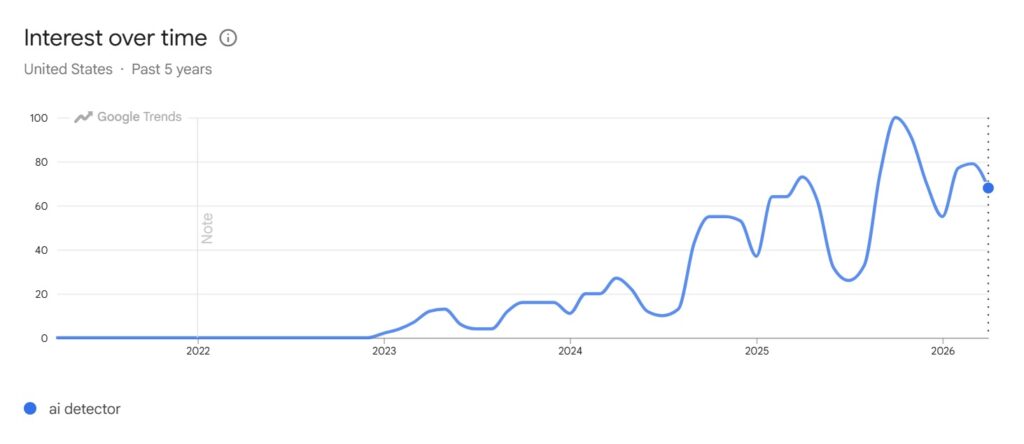
Studies on the risks of AI-assisted writing (particularly “Your Brain on ChatGPT“ by MIT Media Lab) report diminished creativity, lower neural engagement, impaired memory recall, and dramatically lower brain connectivity.
This shouldn’t come as a surprise. If you’ve used AI to help you write, you know quite well that it’s doing heavy brain lifting for you.
As a result, AI has spurred substantial headwinds in the world of academia. For professors and educators, they’re combating an onslaught of AI-written essays and papers, and a new wave of students is consequently becoming dumber.
In the content marketing sphere I’m in, the use of AI is also a controversial topic. While it can be a helpful tool in many ways, using AI as a shortcut to write content devalues its meaning. Oftentimes, clients don’t want it. And the implications for SEO favor the human side.
Why Choosing the Right AI Detector Matters
Selecting the right AI detector tool matters in more ways than one. If you’re using one AI detection tool while your counterparts are using another, you’ll likely encounter discrepancies, which can cause misalignment, or worse, mistrust.
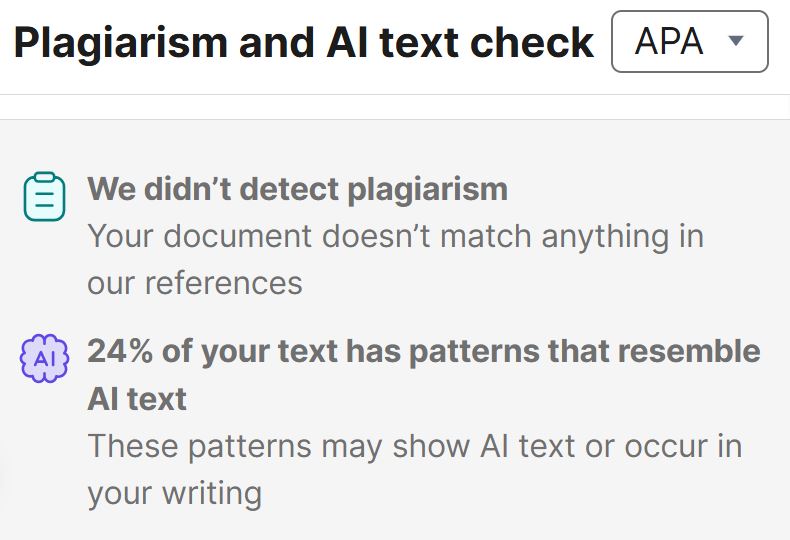
As a writer who’s been using AI for many years, I’ve encountered this very issue. Grammarly said “24% of your text has patterns that resemble AI text,” only to find that the editors and project managers I was working with reported “100% AI-detected text” in the same article. That ball drop jeopardized the relationship with the client.
Consequently, that sort of misalignment can cause career-ending trouble for writers and editors who rely on AI, both for generating content and checking for AI-written text. It’s also a widespread problem in schools, where educators are cracking down on AI-generated papers and dissertations, and students need to tread lightly when using it.
AI isn’t vanishing anytime soon. And balancing the mindful and ethical use of AI is increasingly important across many use cases, from education to marketing.
5 Best AI Detection Tools I’ve Used (and 2 I Recommend)
Alongside the advent of generative AI and its adoption as a writing assistant, countless AI detector tools have been unveiled. Some are more accurate and powerful than others, and some are available for free on a limited basis.
I’ve narrowed this list of AI text detectors to just five tools I deem the best. After all, there’s a lot of clutter and knock-offs out there, so let’s cut to the chase in highlighting the platforms that actually matter.
In discussing each tool below, I tested the 600ish words of text I wrote above to see how each AI detector checks out. I figure this would be the most transparent way to demonstrate the accuracy or effectiveness of each tool (because, in all honesty, I myself wrote those 600ish words with no help from AI),
1. Quillbot’s AI Detector
I first started using Quillbot because I liked its AI humanizer tool. But I also found its AI content detector tool useful for cross-referencing my text with the platforms mentioned below.
QuillBot has been a longstanding staple in the writing community for decades, originally earning a reputation for its paraphrasing tool. In July 2024, QuillBot rolled out its AI detector, which analyzes text for patterns commonly associated with AI-generated content, such as repetitive phrasing, overly formal language, and consistent sentence structures.
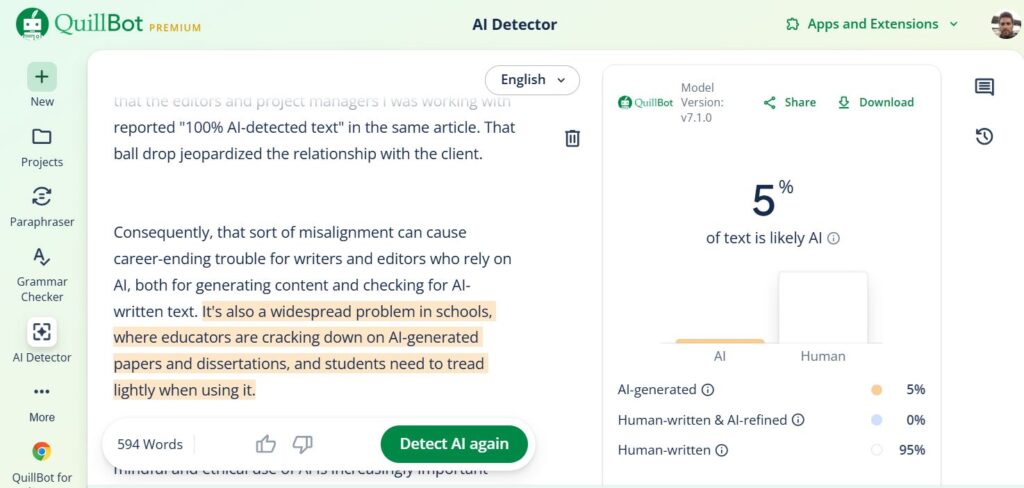
What makes it particularly useful among other detectors is how it presents results. Rather than giving you a blanket percentage, it highlights individual sentences flagged as AI-generated, giving you a granular view of where exactly the issues live.
I’ve noticed Quillbot performs most reliably with clearly AI-written content, but struggles more with hybrid writing and shorter inputs of a couple of hundred words. Its bulk upload feature lets users process multiple documents at scale, and multilingual support across English, Spanish, German, and French gives it broader utility than many comparable tools.
The AI Detector is free up to 1,200 words per check. QuillBot Premium unlocks unlimited word checks, along with its full suite of paraphrasing, grammar, and summarization tools, for $8.33/month (pay $99.95 billed annually).
QuillBot openly acknowledges that its detector is continuously updated to account for emerging patterns from GPT-4, GPT-5, Claude, Gemini, and other LLMs as they evolve. For writers and editors already living inside QuillBot’s ecosystem, it’s a natural and efficient first stop for AI detection.
Go to Quillbot.com to give it a whirl.
2. GPTZero’s Advanced Scan AI Detection
GPTZero is one of the most recognized names in AI detection, and for many good reasons. It was built by Princeton student Edward Tian in 2023 and was one of the earliest dedicated AI detection tools to gain serious institutional traction.
To avoid any misalignment, one of the digital marketing agencies I work with has made GPTZero the gold standard for unifying our distributed team of writers, editors, project managers, and clients. It’s not the cheapest option, but it is one of the most powerful, accurate, and actionable, highlighting individual sections with varying degrees of presumably AI, mixed, or human text.
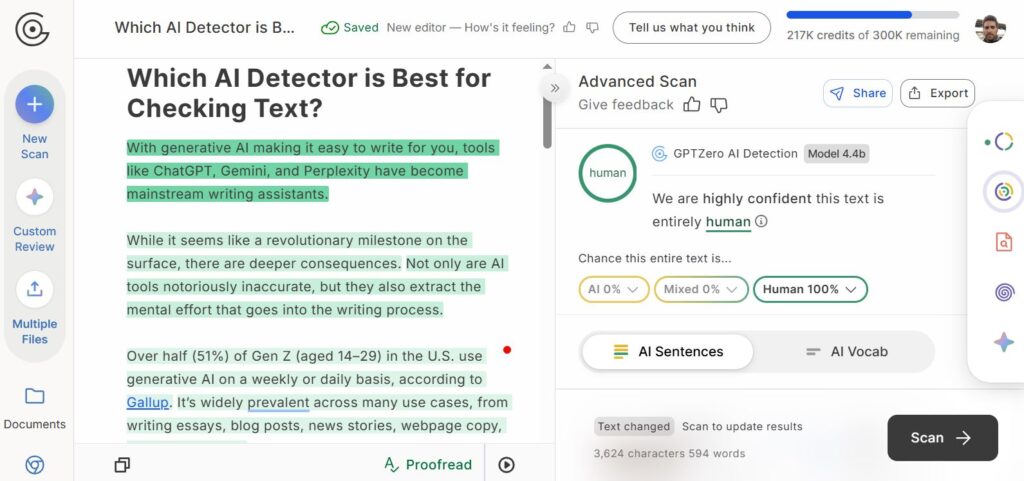
The platform uses two core metrics to evaluate text. There’s perplexity (how unpredictable the word choices are) and burstiness (how much sentence length and structure vary). Natural human writing generally scores much higher on both, while AI-generated text reads as more uniform and predictable. GPTZero claims an accuracy rate of 99% with a false positive rate under 1%, figures the company stands behind publicly, and that have drawn significant institutional attention.
That institutional credibility is one of GPTZero’s strongest selling points. It has been adopted by over 100 school districts across the U.S. and is widely used by universities, publishers, and hiring teams vetting written work. It positions itself squarely in the academic space, though its utility clearly extends into editorial and professional environments as well.
The free tier allows up to 10,000 words per month. As for GPTZero’s paid plans, the Premium plan is $12.99 per month, billed annually (with a maximum of 300,000 words checked per month). A Professional plan runs $24.99/ month, billed annually (with a maximum of 500,000 words checked per month). You save a whopping 45% when you pay annually, so I highly recommend committing to a full year.
Visit GPTZero.com to try it out.
3. Copyleak’s AI Detector
While I think the interface of Copyleak’s AI detector pales in comparison to other tools that I’ve used, its overall accuracy is worth applauding. With a 10+ year track record as a plagiarism detector, Copyleak’s AI detector is a natural extension of that legacy, and it shows in how seriously organizations take it.
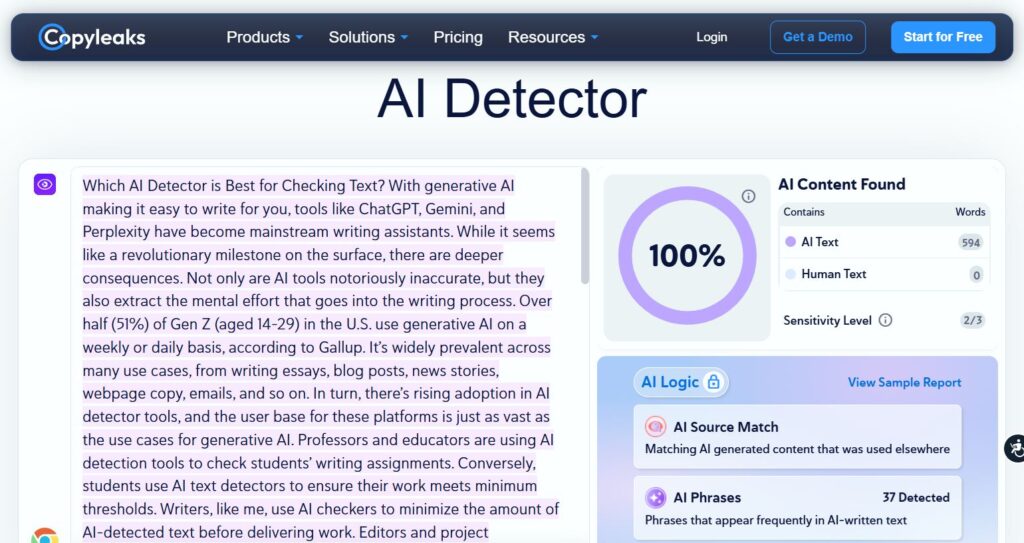
The platform claims a 99.1% accuracy rate in detecting AI-generated content through third-party testing, with a false positive rate of just 0.2%, which is among the lowest in the industry. It supports detection across more than 30 languages, making it one of the more globally capable tools on this list.
Copyleaks is particularly sought after by academic institutions and enterprise teams. It integrates directly with learning management systems like Canvas and Moodle, which has helped it become a go-to choice for universities and K-12 institutions looking for a scalable, automated solution. In addition to academia, legal teams and publishers use it for compliance and editorial quality control.
One big improvement is its Source Code AI Detector, which can find AI-generated code as well as written text. This makes it useful for developers and technical writers as well. The platform also lets reviewers highlight sentences, which shows them exactly which parts of a document set off flags.
Copyleaks offers a free trial with limited scans and two main paid options. Paid personal plans start at around $13.99 per month, with pro pricing jumping to $74.99 per month.
Test it out at Copyleaks.com.
4. Grammarly’s AI Text Checker
Having been a Grammarly power user for many years, I love many of its features for polishing my text. Grammarly’s AI text checker feature was a nice addition to its toolkit; however, it came with considerable flaws in the beginning.
The primary editor I worked with and I used Grammarly for the longest time to detect AI text in the work I would deliver, aiming for a sub-30% threshold across all client work. We were hitting those numbers like clockwork, only to find out that other tools were reporting much higher AI detection in the same text.
In fact, a couple of articles (which I admittedly used AI to help me write) came back as 100% AI-written on GPTZero, and they were below 30% on Grammarly. Come to find out, the tool was quite flawed until an update in mid-2025 that substantially improved the tool’s accuracy and alignment with other AI detection tools.
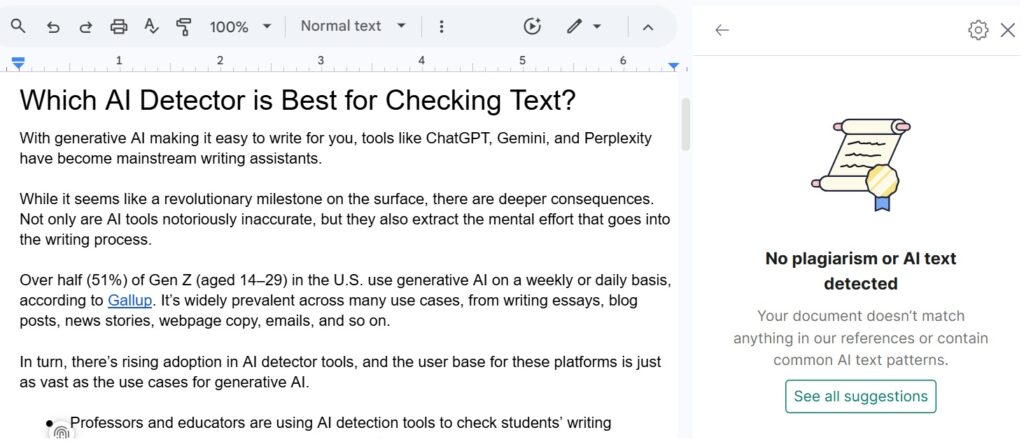
What makes Grammarly’s approach appealing is that it layers AI and plagiarism detection on top of its existing writing analysis engine. This gives us a better idea of how people usually write compared to how AI usually puts sentences and paragraphs together.
Grammarly’s AI detector was made with a wide range of different users in mind. Students, professionals, marketers, and everyday writers who are already using Grammarly can use AI detection without having to switch to a different platform. It’s easy to add Grammarly Business to an existing workflow for teams that are already paying for it.
You can use Grammarly’s AI detector for free with basic features. Grammarly Pro costs $12 a month and gives you access to the full writing assistant and more advanced AI detection tools.
Grammarly is a browser app extension that you can use wherever readable text is present. But you can try out its free AI detector at Grammarly.com.
5. Pangram’s AI Detector
Before I started paying for tools like QuillBot, GPTZero, and Grammarly, I regularly used Pangram’s free AI detector. It offers four free credits, with each credit allowing you to check up to 1,000 words of text. I still appreciate the fact that the free version of Pangram is just as powerful as most paid alternatives.
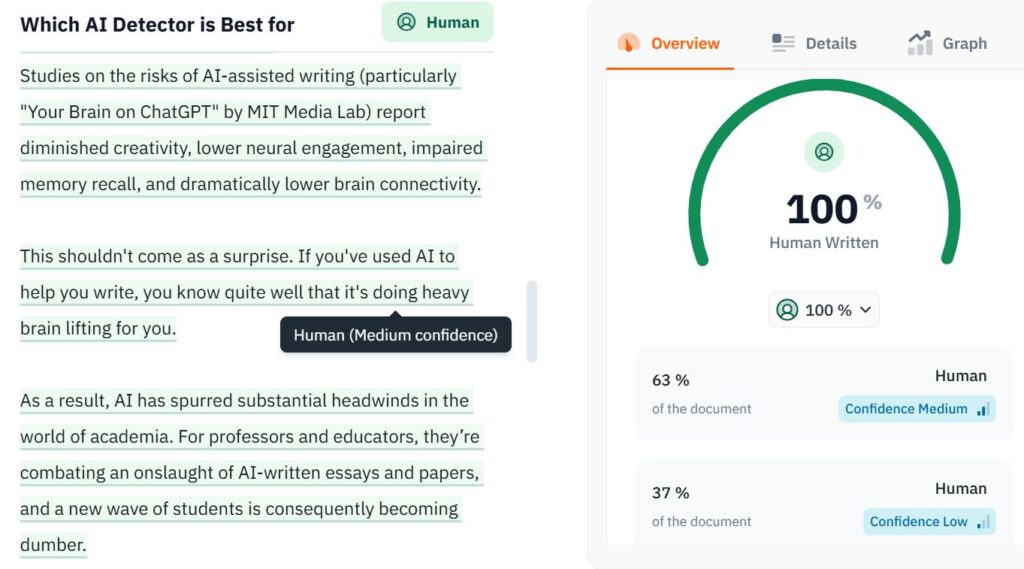
One of the more distinctive aspects of Pangram is its transparency around methodology. Where many tools offer a score without much explanation, Pangram provides detailed insights that editorial teams can actually use to make informed decisions rather than just acting on a number.
For instance, the tool breaks down its overall percentage of human-written or AI text in varying levels of confidence. As you can see in my test scan above, the tool has medium confidence that 63% of the document is human, and low confidence that the remaining 37% is human.
Pangram Labs is in a different class than most AI detectors that are made for consumers. It was made for businesses and publishers, and the technology shows that it was made with that level of care. Pangram doesn’t just use perplexity and sentence-level pattern matching to find AI-generated content; it also uses its own watermarking and statistical fingerprinting methods to do so with a high level of confidence.
The platform claims to be one of the more advanced tools for AI detection, aimed at newsrooms, academic publishers, and large content operations that need results that are reliable and defensible. A number of big news organizations have quietly added it to their editorial review process because it focuses on reducing false positives in professional writing settings.
As I mentioned above, you can use Pangram’s AI detector for free, with a daily limit of 4 credits. Paid plans start at $20 for 600 credits per month, or $65 for 3,000 credits per month. There are separate plans for developer API credits or licensing for institutions, and variable pricing for enterprises needing large-volume solutions.
Go to Pangram.com to give it a try.
Summary: My Top AI Detector Suggestions
If I had to choose just one all-time best AI detector for checking text, it would have to be GPTZero. After over a year of using it alongside these other tools, it’s the most robust in terms of the accuracy, granular detail, and overall insight it offers.
GPTZero can pinpoint specific sentences and words (“AI Vocab” as the tool highlights) that sound AI-written. This allows for precision editing to ensure any piece of content sounds as human as possible.
Secondary to GPTZero, the best free AI detection tool I recommend is Pangram. While free use is limited per day, the Pangram doesn’t hold back in offering in-depth, highly detailed insights on which parts of content are likely AI-written, and it does so at varying degrees of confidence.
If you have any questions about these tools or suggestions for other AI text detection platforms, contact me
FAQs: TL;DR
For the TL;DR that summarizes this post, skim these FAQs.
What is an AI detector?
An AI detector is a tool used to determine whether content is generated by artificial intelligence or produced by a human. There are AI detectors designed to scan text or written content, photos or image-based content, and video content. This post focuses specifically on AI text detection tools and the importance of them.
What is the best AI detector for text?
I find GPTZero to be the best AI text detector, given its intuitive accuracy, precise and actionable scans, and overall value. Not only do my colleagues and I find it the most consistent and indisputable, but it also provides the greatest insight into the AI phrasing that needs the most attention when writing and editing text.
What is the best free AI detection tool?
Pangram is my pick for the best free AI detection tool. Unlike other platforms that only give you an abbreviated version of the tool’s capabilities, Pangram equips you with the same powerful features as the paid version, only limited use per day. The tool provides sentence-by-sentence AI detection and highlights specific words and phrases overused by AI.
Banner Photo by Solen Feyissa
You Might Also Like